Help desk for Joomla

JS Support Ticket

Answer your customers from your own Joomla site. They open tickets on the site or by email; your agents reply, assign, merge and close them from one screen.

See plans
Live demo
Version 1.2.9 Updated 20 Aug 2026 Joomla 4, 5 and 6 29,647 downloads
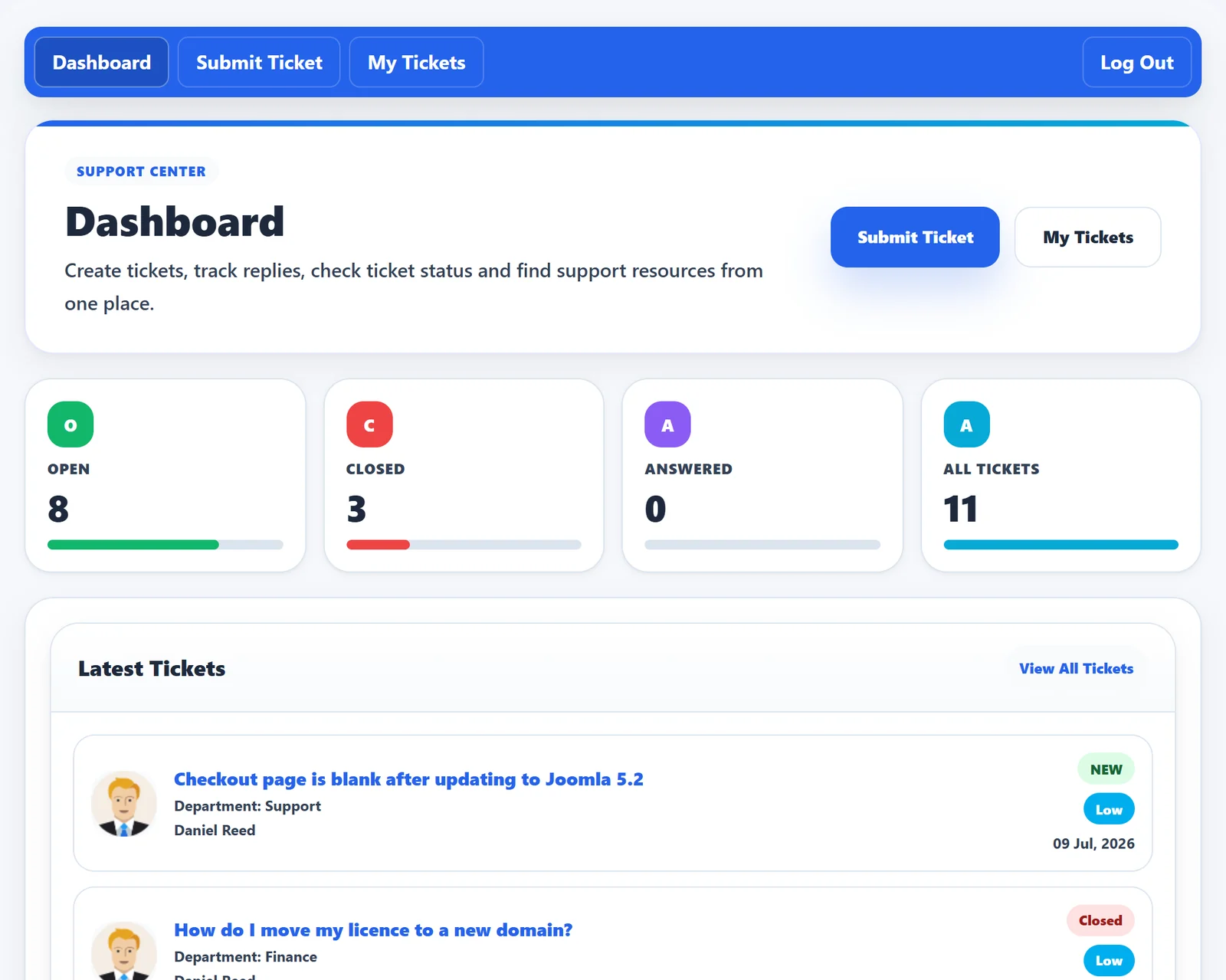
The JS Support Ticket dashboard: open, closed and answered counts and the latest tickets with status and priority
Pricing

Every feature. One yearly price.

Every Pro feature and add-on is in the plan. Choose how many sites the licence covers. Updates and help from the developers come with it, all year.

JS Support Ticket Pro

Every Pro feature, a year of updates and help, renews yearly. Cancel anytime.

How many sites?
  • Unlimited Agents
  • Guest Tickets
  • Unlimited Departments
  • Unlimited Custom Fields
  • Unlimited Priorities
  • Email Notifications
  • Email templates
  • Ticket Actions
  • Agent roles and permissions
  • Ticket Auto-Close
  • FAQ
  • Help topics
  • Max Tickets
  • Ticket Overdue
  • SMTP email
  • Ticket History
  • User Options
  • 3 plugins
  • 4 modules
  • Export
  • Announcements
  • Internal Mail
  • Private notes
  • Canned responses
  • Themes
  • Feedback
  • Knowledge Base
  • Merge Tickets
  • Email Piping
  • Time Tracking
  • Ban email addresses
  • Downloads
  • Updates inside JoomlaNew versions install from the admin.
  • Help from the developersAsk by ticket from your account.
  • Yours to keepStop renewing and it keeps working.
What it does

Everything a support team needs, inside Joomla.

Everything below is in JS Support Ticket Pro; the table further down shows what the free version includes.

For your customers

Open a ticket their way
From the site as a registered user, as a visitor without an account, or by sending an email.
Track every ticket
A clear ticket list with search and sorting, and the full history of each ticket.
Help themselves first
Knowledge base, FAQs, downloads and announcements on the same site.
Attachments and feedback
Send screenshots and files with a ticket, and rate the help when it’s closed.

For your agents

Act on tickets fast
Close, print, edit, merge, lock or mark overdue from one screen.
Work as a team
Assign to an agent, transfer between departments and staff, and leave internal notes customers don’t see.
Answer faster
Canned responses for common questions, and time tracking on every ticket.
Private credentials
Customers can share logins in a ticket without them showing in the thread.

For you, the site owner

Staff, roles and permissions
Add staff members and decide what each role can see and do.
Departments, priorities and help topics
Route tickets to the right people, with automatic or manual overdue rules.
180+ settings and email templates
Set up ticket, email, user, staff and visitor rules, edit every email, and send through SMTP.
Reports, colours and languages
Department and ticket reports, colour presets for your design, translations and right-to-left languages.
Free or Pro

What the free version includes.

The free version runs a complete help desk: unlimited tickets, departments, help topics and canned responses. Pro adds agents with roles, self-help, tickets by email and team reports.

FeatureFreePro
For your customers
Unlimited tickets with attachmentsOpen from the site, follow every reply✓✓
Departments, priorities and help topicsTickets reach the right team from the start✓✓
Custom ticket fieldsAsk for the details you need, your way✓✓
Self-helpKnowledge base, FAQs, downloads and announcements–✓
FeedbackCustomers rate the help when a ticket closes–✓
For your agents
Reply, close, reopen and transferChange priority and move tickets between departments✓✓
Canned responsesSaved replies for the questions you answer every day✓✓
Agents with roles and permissionsAdd staff and decide what each one can see and do–✓
Assign and internal notesHand a ticket to an agent; notes customers never see–✓
Lock, overdue and mergeControl ticket state and join duplicates into one thread–✓
Time tracking and internal mailTime spent on each ticket; messages between agents–✓
For you, the site owner
Email templates, themes and translationsEvery email, the colours, the language✓✓
Overall reportTicket activity at a glance✓✓
Team reportsStaff, department, user and satisfaction reports–✓
Tickets by emailEmail to your support address becomes a ticket–✓
Export and email bansExport tickets; block addresses that abuse the desk–✓
Updates and supportA year of Pro updates and help by support ticket–✓

Modules and plugins in Pro

  • Latest knowledge base
  • Popular knowledge base
  • Latest FAQs
  • Popular FAQs
  • Latest announcements
  • Popular announcements
  • Latest downloads
  • Popular downloads
  • Support icon on the front end
Questions

About JS Support Ticket.

More answers in the documentation, or ask us in a ticket.

Which Joomla versions does it run on?

JS Support Ticket 1.2.9 runs on Joomla 4, 5 and 6.

How do I upgrade from the free version?

Buy a plan, then paste your activation key in the Pro Installer inside Joomla. It adds every Pro feature and add-on on the same site, and your tickets stay. The upgrade guide shows each step.

Can customers open tickets without an account?

Yes, in Pro. You decide in the settings whether visitors may open tickets, and whether they see a captcha.

Can customers open tickets by email?

Yes, in Pro. Emails sent to your support address become tickets, and replies by email are added to the thread.

Is there a WordPress version?

Yes. The WordPress edition is called JS Help Desk and has its own site, jshelpdesk.com.

What happens when my updates period ends?

JS Support Ticket keeps working on your site. You stop getting new versions and support until you renew.

Can I move my licence to a new domain?

Yes. Open a ticket from your account and we move the key to the new site.

Try JS Support Ticket on your own site.

The free version installs in a few minutes. Upgrade to Pro when your team grows.

See plans